Most outbound teams wreck their sender reputation before they exhaust their prospect list. The root cause is almost always the same: unverified addresses, sent too fast, with no suppression workflow in place. This guide covers a repeatable, ethical process for finding business email addresses, choosing the right tools, and sending without torching your domain.
TL;DR (Key Takeaways)
- Confirm the person and company first. Wrong-person outreach is worse than no outreach.
- Infer the email format from public sources, then generate a small set of permutations if the pattern is unclear.
- Use Google search operators, LinkedIn, and company websites as your primary discovery channels before reaching for paid tools.
- Verify every address before sending. Hard bounces compound into deliverability problems fast.
- Use tools for scale, not shortcuts. Email finders, enrichment platforms, and verification services each solve a different problem.
- Comply with opt-out and sender requirements. Suppression lists, authentication, and complaint monitoring are non-negotiable operational hygiene.
- Send slowly, monitor continuously. Warm up, throttle, and suppress aggressively.
Why Finding the Right Email Shapes Deliverability, Reputation, and Response Rates
Every email that bounces chips away at your sender reputation. Mailbox providers like Google and Yahoo track bounce rates and spam complaints at the domain level, so a batch of bad addresses drags down inbox placement for your entire team. The connection between list quality and deliverability is direct and measurable.
Response rates follow the same logic. A verified, correctly targeted work email sent to the right person at the right company will outperform a scraped list by an order of magnitude. Precision in finding email addresses pays compound returns on every message you send.
"Don't Do This" List
- Scraping personal email addresses. Pulling someone's personal Gmail or Yahoo address from a data breach dump, social profile, or public record and sending B2B outreach to it is a compliance risk and a fast track to spam complaints.
- Ignoring opt-outs. If someone unsubscribes or asks to stop receiving messages, suppressing that address immediately is both a legal obligation and a reputation safeguard. There is no "cooling off period" that lets you re-add them next quarter.
- Deceptive sender names or subject lines. Misrepresenting who you are or what the email is about violates CAN-SPAM and will get you flagged by recipients and mailbox providers alike.
12 Methods to Find Someone's Work Email (In Order)
The methods below move from manual-first techniques to tool-assisted approaches. Start at the top, and reach for paid tools only when free methods fall short.
1. Confirm the Person and Company
What to do: Check LinkedIn to verify the prospect's current role, title, and tenure at the company you intend to contact. Cross-reference with the company's team or leadership page if one exists.
When it works: Always. This is a prerequisite, not an optional step. Skipping it leads to emails addressed to people who left the company months ago.
Caution: Wrong-person outreach damages your credibility and wastes verification credits on addresses that belong to former employees.
2. Find the Company's Email Format
What to do: Look for employee email addresses published in press releases, blog author bylines, conference speaker pages, SEC filings, or support forum posts. One confirmed address reveals the format (e.g., [email protected]) for the entire domain.
When it works: Best for mid-size and large companies that produce public-facing content. Smaller companies with no web presence may require other methods.
Caution: Confirm the address you find is current; companies occasionally migrate to new email formats or domains without updating old pages.
3. Generate Email Permutations
What to do: When you cannot find a confirmed address, generate a small set of candidates based on common patterns. For Jane Smith at acme.com, reasonable permutations include [email protected], [email protected], [email protected], [email protected], [email protected], and [email protected].
When it works: When you know the domain but cannot locate a single published address to confirm the format. Six permutations is a practical ceiling.
Caution: Never send to all permutations. Verify first, then send to the single best candidate. Blasting multiple guesses on one domain triggers spam filters and signals to IT teams that you are guessing.
4. Use Google Search Operators
What to do: Run targeted queries like "jane smith" "@acme.com" or site:acme.com "jane smith" email to surface addresses buried in PDFs, cached pages, and archived blog posts. Try variations with the company domain in quotes.
When it works: Surprisingly effective for executives who have spoken at events, published content, or been quoted in press coverage. Works best when the person has a public-facing role.
Caution: Addresses found in cached or archived pages may be outdated. Verify any address discovered this way before sending.
5. Check the Company Website
What to do: Visit "About Us," "Team," "Contact," and blog pages on the company's website. Author bylines on company blogs often show the full email address or at least the format.
When it works: This is the lowest-friction, highest-accuracy method when the company publishes employee contact information. Common for small businesses, agencies, and professional services firms.
Caution: Some "Contact Us" pages only list role accounts like info@ or sales@, which are poor targets for personalized cold outreach.
6. Search LinkedIn for Contact Info
What to do: If you are connected to the prospect, check the "Contact Info" section on their LinkedIn profile for a listed email address. If you are not connected, review their posted content, articles, and activity feed for domain clues or links to personal sites with contact pages.
When it works: Best when you share a connection or when the prospect actively publishes on LinkedIn. Some professionals list a work email directly in their profile.
Caution: LinkedIn contact info is sometimes a personal address, not a work address. Confirm the domain before using it for B2B outreach.
7. Check Social Platforms and Personal Websites
What to do: Look at Twitter/X bios, GitHub profiles, and personal websites for published contact information. Open-source contribution logs and GitHub commit histories sometimes include email addresses in plain text.
When it works: Effective for technical roles (developers, engineers, DevRel) and public-facing professionals (founders, consultants, freelancers) who maintain a personal web presence.
Caution: You may find a personal address rather than a work address. Do not send B2B outreach to a personal account found on a social platform. Stick to a business context.
8. Use an Email Finder Tool
What to do: Input the prospect's name and company (or domain) into an email finder tool. These tools work by crawling public sources, aggregating data from partnerships, and applying pattern inference to return a probable email address.
When it works: When manual methods have not produced a result, or when you need to find email addresses for dozens or hundreds of prospects. Coverage and accuracy vary widely by provider and by domain.
Caution: Match rates of 60% to 80% are common, but match rate alone is misleading if many results point to catch-all domains. Always run found addresses through a separate verification step before sending.
9. Use an Enrichment Platform
What to do: Feed a partial record (a LinkedIn URL, company name, or name plus domain) into an enrichment platform to append work email, phone, title, company size, and other data fields. Enrichment is broader than email finding and fills out CRM records for segmentation and routing.
When it works: Best for teams building or cleaning prospect lists at scale, especially when you need more than just an email address. Useful for filling gaps in imported lists.
Caution: Enrichment data ages quickly. People change jobs, and a record from 18 months ago may point to an address that no longer exists. Re-verify before sending.
10. Try a Chrome Extension for Email Lookup
What to do: Install a browser extension that overlays email lookup on LinkedIn profiles or company websites. These extensions typically query the same databases as standalone email finders but surface results inline as you browse.
When it works: Convenient for one-off lookups while prospecting on LinkedIn. Reduces context-switching between browser tabs and separate tools.
Caution: Some extensions collect browsing data or require permissions that create privacy risk for your organization. Evaluate the extension's data practices before installing, and confirm the addresses it returns with a verification service.
11. Reverse Phone Lookup (Use with Strong Caution)
What to do: If you have a prospect's phone number from a business directory or CRM record, some lookup services can return associated email addresses.
When it works: Occasionally useful when all other methods have failed and you have a verified business phone number. Hit rates are low for B2B contacts.
Caution: Reverse lookup databases often return personal email addresses, not work addresses. The data sourcing behind these services is frequently opaque, and using them for unsolicited outreach may violate privacy regulations in some jurisdictions. Treat this as a near-last resort.
12. WHOIS Lookup (Last Resort)
What to do: Query the WHOIS record for the prospect's company domain to check whether an admin or registrant email is listed.
When it works: Rarely. Most domains now use privacy protection services that mask registrant contact information. When WHOIS does return a valid address, it is often a generic admin contact rather than a personal work email.
Caution: WHOIS addresses are almost never the right target for personalized outreach. Use this method only to identify the email domain or format when every other approach has come up empty.
After You Find the Address: Verify Before Sending
Verification is the step most teams skip, and it is the step that protects your sender reputation. An email verification service pings the mail server (via SMTP handshake) to check whether the address exists, without delivering a message.
A good verification result tells you whether the address is valid, invalid, or risky. "Risky" typically means the server accepted the connection, but the address could not be confirmed with certainty, often because the domain is configured as catch-all. Invalid addresses should be removed immediately; risky addresses deserve extra caution.
Before verifying any specific address, confirm the domain itself is active. A quick MX record lookup (using dig mx acme.com or a free DNS tool) tells you whether mail servers are configured. Watch for companies that use a separate domain for corporate email (e.g., acmeinc.com instead of acme.com).
Common Verification Pitfalls
Catch-all domains. Some companies configure their mail server to accept email sent to any address at their domain. Verification will return "valid" for [email protected], but the message may bounce internally or land in a dead mailbox. Flag catch-all results and send to them in small monitored batches.
Role accounts. Addresses like info@, sales@, support@, and team@ are role-based, not personal. Sending cold outreach to role accounts typically yields low response rates and higher complaint rates, since multiple people may monitor the inbox.
Stale data. People change jobs. A database entry from 18 months ago may point to an address that no longer exists. If your enrichment provider does not indicate when the record was last verified, treat every result as potentially stale and re-verify before sending.
Accept-all traps. Similar to catch-all, some servers are configured to accept all connections at the SMTP level but silently discard unrecognized addresses. Verification tools cannot reliably detect this behavior, which means you will see "valid" results that still bounce or disappear.
Ready to build a repeatable email-finding workflow? See how Buzz connects prospecting, enrichment, and outreach in one platform.
Using Buzz to Operationalize Email Finding
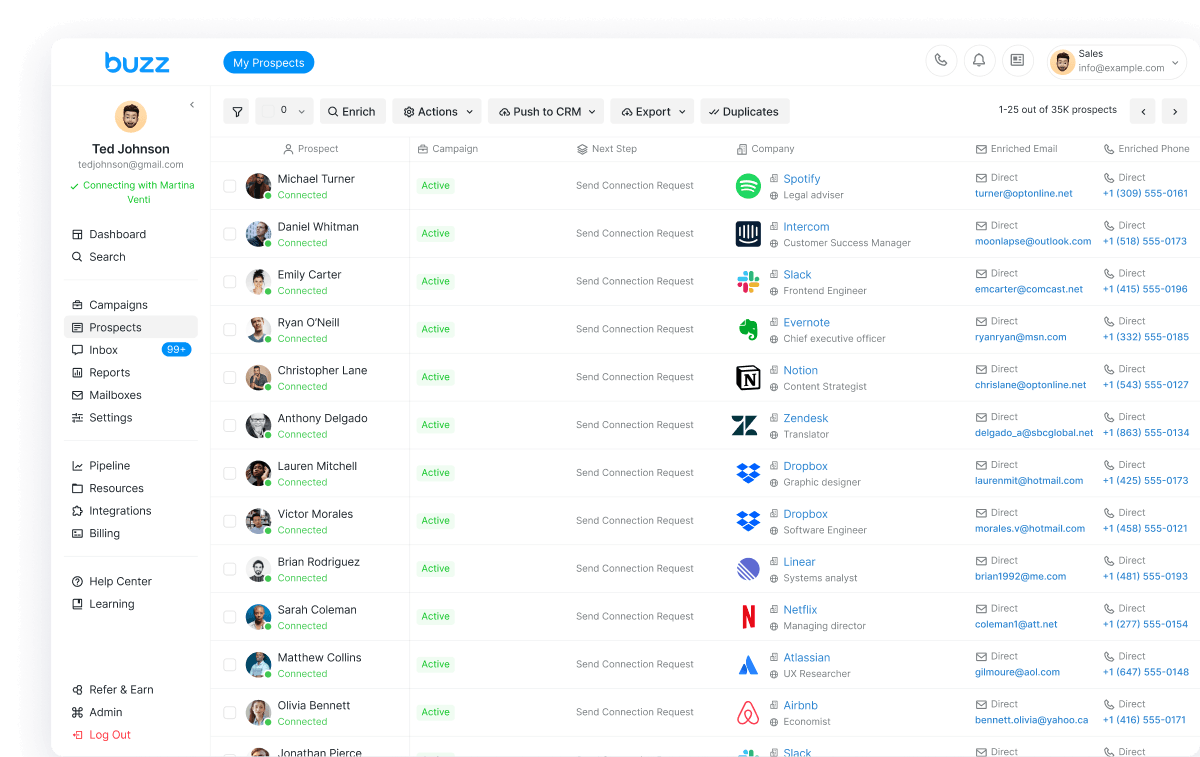
The methods above work for individual prospects, but teams running outbound at volume need a system that connects identification, enrichment, and outreach in a single flow. Buzz, an AI-powered sales engagement platform, structures this process around three stages: Identify, Enrich, and Engage.
Identify. Buzz helps teams build targeted prospect lists by defining company and contact criteria. The identification layer is where you narrow the audience, filtering by role, industry, geography, and company attributes so that the downstream enrichment budget is spent on contacts worth reaching.
Enrich. Once a list is built, Buzz's enrichment step appends work email addresses and additional contact data. Because enrichment and verification happen within the same platform, teams avoid the friction of exporting CSVs between separate finder, enrichment, and verification tools.
Engage. With verified addresses in hand, Buzz's engagement layer supports structured outbound sequences. Buzz's email writing supports generating variations for outbound messages, giving reps a starting point they can personalize rather than a blank compose window. Running the full Identify, Enrich, Engage loop inside one platform reduces data loss between steps and makes suppression (opt-outs, bounces, complaints) easier to enforce consistently.
Deliverability: How to Email New Contacts Without Burning the Domain
Finding the address is half the problem. Getting the message into the inbox is the other half. Deliverability is a function of sender reputation, technical authentication, and list hygiene, all of which degrade quickly when you send to unverified addresses.
Opt-Outs, Complaints, and Reputation: Why Suppression Is Non-Negotiable
Every spam complaint logged against your domain increases the probability that future messages land in the spam folder or get rejected outright. Mailbox providers aggregate complaint signals over time, so a few bad days can take weeks to recover from.
Suppression lists are the operational mechanism that prevents this damage. When a recipient opts out, clicks "Report Spam," or hard-bounces, their address must be added to a suppression list and excluded from all future sends immediately. Treating suppression as optional is the fastest way to lose inbox placement across your entire sending domain.
What Mailbox Providers Expect from Bulk Senders
Google's email sender guidelines and the associated FAQ outline requirements for senders, with stricter rules for those sending at higher volumes. Yahoo publishes a similar set of expectations in its sender best practices documentation.
Both providers expect senders to authenticate their domain (SPF, DKIM, and DMARC), maintain spam complaint rates below 0.3%, support easy one-click unsubscribe, and send from domains with clean reputation histories. These are baseline requirements, not aspirational targets. Failing to meet them results in throttling, filtering, or outright blocking.
Practical Sending Guardrails for Cold Outreach
Warm up new domains and mailboxes. Sending 500 cold emails on day one from a brand-new domain is a red flag to every mailbox provider. Start with low volume (10 to 20 messages per day) and increase gradually over two to four weeks.
Throttle send rates. Even on a warmed domain, sending hundreds of messages in a short burst triggers rate-limiting. Spread sends across the day, and cap per-mailbox daily volume to stay within provider thresholds.
Segment and personalize. Sending the same template to a 10,000-person list looks like spam because it is spam. Segment by persona, industry, or use case, and vary the message enough that each segment receives relevant content. Enforce suppression in near-real time: when someone opts out at 9 AM, they should not receive your afternoon batch.
Compliance: Practical Guidance (Not Legal Advice)
B2B cold email operates in a regulatory environment that varies by jurisdiction. What follows is a practical overview of two commonly referenced frameworks. Consult legal counsel for advice specific to your situation.
UK: ICO B2B Marketing Guidance. The UK Information Commissioner's Office publishes guidance on how PECR and UK GDPR apply to business-to-business marketing. The key distinction is between "corporate subscribers" (registered companies, LLPs) and "individual subscribers" (sole traders, some partnerships), which affects whether electronic marketing rules apply. Even when emailing a corporate subscriber, if you process an individual's personal data for direct marketing, UK GDPR still requires a lawful basis and transparency about how their data is used.
US: FTC CAN-SPAM. The FTC's CAN-SPAM compliance guide requires that commercial emails include accurate header information, non-deceptive subject lines, a valid physical postal address, and a clear opt-out mechanism. Opt-out requests must be honored within 10 business days. Senders are also responsible for compliance when agencies or contractors send on their behalf.
Across both frameworks, the operational takeaways are consistent: identify yourself honestly, make opting out easy, suppress promptly, and do not use deceptive tactics to get emails opened. Recipients always have the right to object to direct marketing.
(Check out this article for a more in-depth guide on email deliverability best practices.)
Want to stop stitching together separate tools for finding, verifying, and emailing prospects? Try Buzz to run the full Identify, Enrich, Engage workflow from a single platform.