A sales rep at a mid-sized SaaS company spent three hours crafting 50 personalized social connection requests on a Tuesday. By Thursday, she had 14 acceptances and three replies. Meanwhile, her colleague sent 200 generic requests using an automation tool and got his account flagged within 48 hours.
LinkedIn drives 80% of B2B social media leads across more than 1 billion users, but cold outreach reply rates have declined from 10-15% to 5-7% in 2026. SDRs face technical complexity managing multiple accounts, declining responses, and outdated lead lists that waste hours of prospecting time.
In this article, we'll provide compliance-first automation strategies, tested sequences, and profile optimization frameworks that keep your account safe while scaling outreach that actually converts.
The State of Social Outreach in 2026
Why Social Outreach Still Dominates B2B
Four out of five LinkedIn members drive business decisions, making the platform a goldmine when your ideal customer is another business. LinkedIn outreach delivers 20-35% reply rates versus cold email's 4-5%—a 7x performance advantage that's hard to ignore.
By 2026, LinkedIn sellers achieve 2x higher ROI compared to cold email and phone outreach. The professional intent baked into LinkedIn beats spray-and-pray tactics every time.
Current Challenges and Declining Response Rates
91.5% of cold messages are completely ignored, a sobering statistic that reflects oversaturated inboxes and generic outreach. Cold email open rates fell to 27.7% in 2024, down from 36% the prior year, while typical reply rates now hover at 1-5%.
About 17% of cold emails are blocked or land in spam due to poor domain reputation. High-volume, low-quality activity hurts visibility across LinkedIn's algorithm, affecting not just your content but, your message deliverability too.
The Real Pain Points SDRs Face
It's easy to reach handpicked decision-makers initially, but overwhelming as your pipeline grows. SDRs waste time targeting broad groups like "VP of Sales at SaaS companies" without a clear engagement strategy. And most campaigns stop after one message, leaving 60-70% of potential results untapped. The difference between mediocre and excellent performance comes down to systematic follow-up.
Social Profile Optimization for Sales
Why Your Profile Is Your Digital Storefront
Prospects evaluate your profile before reading messages or accepting connection requests. People decide in 3-6 seconds whether to trust you on LinkedIn, which means clarity beats cleverness every time.
Profiles with strong summaries receive 27% more connection requests. Your profile acts as social proof, answering the silent question every prospect asks: "Why should I care what this person has to say?"
Crafting a High-Converting Headline
Your headline appears in search results, connection requests, and every comment you make. The most effective structure follows this formula: [Who you help] + [How you help them] + [The result they achieve].
Use all 220 characters to showcase value proposition beyond the job title. Instead of "Account Executive at TechCorp," try "Helping B2B SaaS companies reduce churn by 30% through customer success automation." One tells prospects what you do for your employer. The other tells them what you can do for them.
Optimizing Your Summary and About Section
High-performing profiles answer four questions: Who you are, what you do, who you help, and why someone should trust you. Structure your summary to address your target audience's primary challenge first, present your unique approach second, and close with proof.
Skip the flowery language and get straight to what matters for your prospects. Nobody cares that you're "passionate about synergistic solutions."
LinkedIn Connection Request Best Practices
Character Limits and Message Structure
Connection messages are limited to 300 characters for premium/Sales Navigator users and 200 for free accounts. Messages under 300 characters get 19% more responses than longer alternatives.
make every word count. Generic templates waste precious character space that could demonstrate why connecting benefits the prospect.
Personalization That Actually Works
Personalized connection requests see 58% higher acceptance rates. Connection requests with messages get 9.36% response versus 5.44% without, proving that a few thoughtful words dramatically improve results.
Messages referencing job change, content, or company news see 27% higher reply rates. Outreach tied to recent activity, like webinar attendance or promotions, boosts responses by 32%. Timely relevance beats generic compliments.
Timing and Volume Recommendations
Tuesday, Wednesday, and Thursday are optimal days for connection requests. Avoid Mondays when inboxes are hectic and Fridays or weekends when people focus on personal time.
Most prospects respond on Thursdays, with Saturday being the least likely day for replies. Time your outreach to match when decision-makers are most engaged with the platform.
Building High-Converting Social Outreach Sequences
The Anatomy of a Multi-Touch Sequence
A proven structure consistently outperforms single-touch approaches: Profile visit → Engage with content → Connection request → First message → Follow-ups. Design sequences with 4-5 messages over 15-20 days with natural intervals.
Sequenced follow-ups spaced 2-5 business days apart improve conversions by 49%. The spacing signals persistence without desperation.
Message #1: The Connection Request
Add a personalized note demonstrating value and your reason for connecting. Reference a specific profile element, shared connection, or recent activity that caught your attention.
Keep under 300 characters for premium accounts and 200 for free users. Front-load the value proposition so prospects immediately understand what's in it for them.
Message #2: The Thank-You / Value Share
Send 2 days after connection acceptance. Share a relevant resource, insight, or genuine compliment about their work.
No pitch at this stage. Focus on relationship building and establishing credibility before asking for anything.
Message #3: The Soft Pitch
Send 7 days after the initial message if no reply. The first message brings 37.5% of total responses, making this your highest-leverage touchpoint.
Lead with a question or observation that invites dialogue rather than a hard sales pitch. The most effective messages stay under 300 characters.
Message #4-5: The Strategic Follow-Ups
The first follow-up generates 31.5% of replies, nearly matching your initial message performance. The second follow-up brings 17.7% response rate, while the third follow-up yields 8%.
Follow up 2-3 days after initial outreach, then every 4-7 days. Wait a minimum of 24 hours between messages to avoid appearing spammy.
Voice Messages and Video Outreach
Voice messages generate 15-20% more replies than text. They're dramatically underutilized, signaling genuine effort in a sea of automated outreach.
The personal touch cuts through inbox noise. Prospects can hear your tone and enthusiasm, building rapport faster than text alone.
Personalization at Scale: Beyond First Name Tokens
What "Personalization" Really Means in 2026
63% of people never respond to non-personalized messages. Personalized messages get 32.7% higher response rate, proving that generic templates kill conversion.
AI-assisted messages show 4.19% reply rate versus 2.60% without AI, suggesting that smart automation can actually improve personalization at scale. The key is using AI to inform your message, not write it entirely.
Research That Matters vs Research That Wastes Time
Effective personalization references job change, content, or company news. SDRs waste time chasing "perfect" influencers who don't match their ideal customer profile or have large followings but no real influence.
Focus on decision-makers with actual buying authority. A VP with 500 connections who matches your ICP beats an influencer with 50,000 followers who will never buy.
Personalization Variables That Convert
Recent activity like webinar attendance or promotions drives 32% higher response. Job change, published content, and company news boost reply rates by 27%.
Shared connections, mutual groups, and common interests provide natural conversation starters. These variables work because they demonstrate you've done homework beyond reading a job title.
Social Automation: Tools, Safety, and Compliance
LinkedIn's Automation Detection in 2026
LinkedIn uses machine learning to analyze behavior patterns, timing, content, device, and location. Activity volume must stay 30-40% below published limits to prevent algorithmic triggers.
LinkedIn's detection has become sophisticated enough to catch patterns that look robotic, even if they stay within stated limits. Your automation tool needs to act like a caffeinated human, not a predictable robot.
Safe Daily and Weekly Limits
Connection Requests:
New accounts should send 10-20 invites per day. Established accounts can handle 40-50 per day maximum, though most experts recommend staying under 20 per day and gradually scaling.
Weekly limit sits at 80-100 requests, reaching 100-200 with high Social Selling Index and premium accounts.
Messages:
Free accounts should cap at 50 per day. Premium accounts can send 75-100 per day, while Sales Navigator allows 250 per day.
Profile Visits
Free accounts should stay around 100 per day. Premium accounts can visit approximately 250 per day, while Sales Navigator users can reach 500 per day.
How to Scale Social Outreach Safely
Use tools with automatic activity level adjustments, random delays, and compliance monitoring. Cloud-based tools with dedicated IPs, account warm-up, and smart limit ranges reduce detection risk by mimicking human behavior patterns.
Spread volume across multiple accounts to stay in the safe zone. This multi-account strategy has become essential for teams running high-volume campaigns.
Open Profile Strategy for Bypassing Limits
Open Profiles are LinkedIn Premium users, and anyone can message them directly. One of the most underutilized features for bypassing connection request limits, Open Profiles lets you send messages without burning connection requests.
Filter your prospect searches to show only Open Profiles. You'll reach fewer total prospects but can message them immediately without waiting for connection acceptance.
Avoiding Common Social Outreach Mistakes
Spam Triggers to Avoid
High-volume, low-quality activity hurts algorithmic visibility. Activity volume exceeding 30-40% below published limits triggers reviews.
For instance, LinkedIn's algorithm penalizes accounts that look like spam factories, reducing both message and content reach. Don't be that account.
The "Spray and Pray" Approach
91.5% of cold messages are completely ignored, often because they lack relevance to the recipient. Most campaigns stop after one message, losing 60-70% of potential results.
Building a systematic follow-up sequence separates successful outreach from wasted effort. The fortune is in the follow-up.
Poor Targeting and List Quality
SDRs at the mercy of outdated or poorly segmented lists waste hours on dead ends. Chasing influencers who don't match ICP or have no real buying authority produces impressive vanity metrics but zero pipeline.
Invest time upfront building targeted lists based on actual buying signals. A smaller list of qualified prospects outperforms a massive list of loosely relevant contacts.
Buzz: Social Outreach Automation Done Right
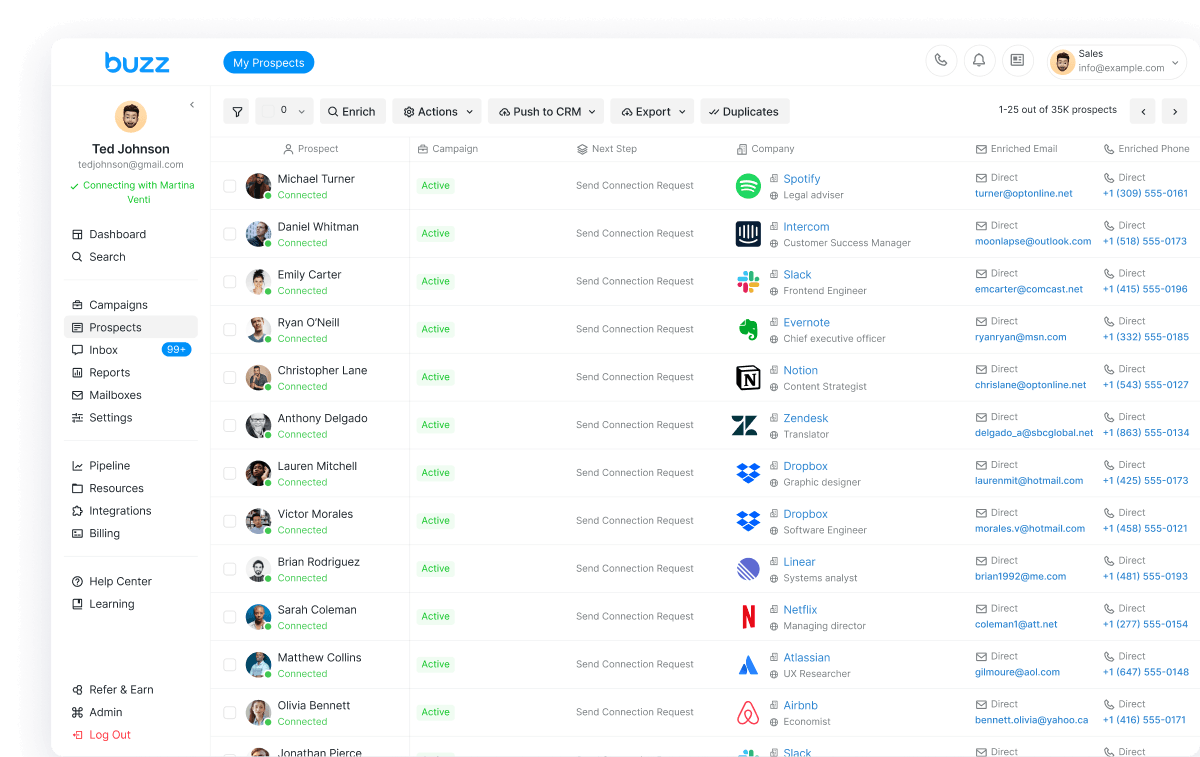
Buzz takes a different approach to Social automation by combining lead scraping, connection automation, and email outreach in a single platform. The tool enables scraping of qualified leads directly from a Social search URL, post, or event URL, which then allows for the automation of personalized connection requests and follow-up sequences.
Buzz's safety features include automatic activity throttling, customizable delays between actions, and account warming protocols that gradually increase outreach volume. The platform stays within the Social platform's safe limits while maximizing your daily outreach capacity across connection requests, messages, and profile visits.
Book a Demo
Ready to scale your Social outreach without risking your account? Book a demo to see how automated lead scraping, connection requests, and integrated CRM can transform your Social prospecting workflow.
Quick Wins You Can Implement Today
- Optimize your headline using the structure: Who you help + How you help + Result achieved. This single change can increase profile views and connection acceptance within 24 hours.
- Add personalized notes to connection requests for 58% higher acceptance. Reference something specific from their profile rather than sending blank requests.
- Send your first follow-up 2-3 days after the initial message, capturing 31.5% of replies. Most SDRs stop after one message, leaving the majority of potential responses on the table.