Many agencies already sell LinkedIn outreach. The question is how they get paid for it. Hourly delivery caps your revenue at your team’s time. White label LinkedIn software changes the model: clients log into a product with your name on it, you set the price, and you bill them every month.
This post is the business side of reselling LinkedIn automation: which model to pick, what you are actually reselling, how to build your own pricing and margin math, which costs to pass through, and the launch steps from demo to first paying client. If you want the product explainer first, read white label LinkedIn automation. If you want the day-to-day playbook for running client accounts, read LinkedIn automation for agencies.
Three ways to sell LinkedIn automation
Before you pick a tool, pick a business model. Agencies usually choose one of three, and many move from one to the next as they grow.
| Model | Who runs the outreach | How you earn | Who owns the brand |
|---|---|---|---|
| Done-for-you service | Your team, inside your own tool seats | Retainers or project fees | You (the tool stays behind the scenes) |
| Referral / affiliate | The client, on the vendor’s product | A commission per referral (the Buzz Affiliate page lists up to 30% per successful referral) | The vendor |
| White label resell | The client, inside your branded platform (or you, for managed tiers) | Recurring software subscriptions at prices you set | You — clients never see the vendor |
Service is the easiest start, but every new client needs more team hours. Referral is light work, but the vendor owns the client. White label sits in between: the platform does the work, and the brand, price, and client relationship stay with you.
What you actually resell with white label LinkedIn software
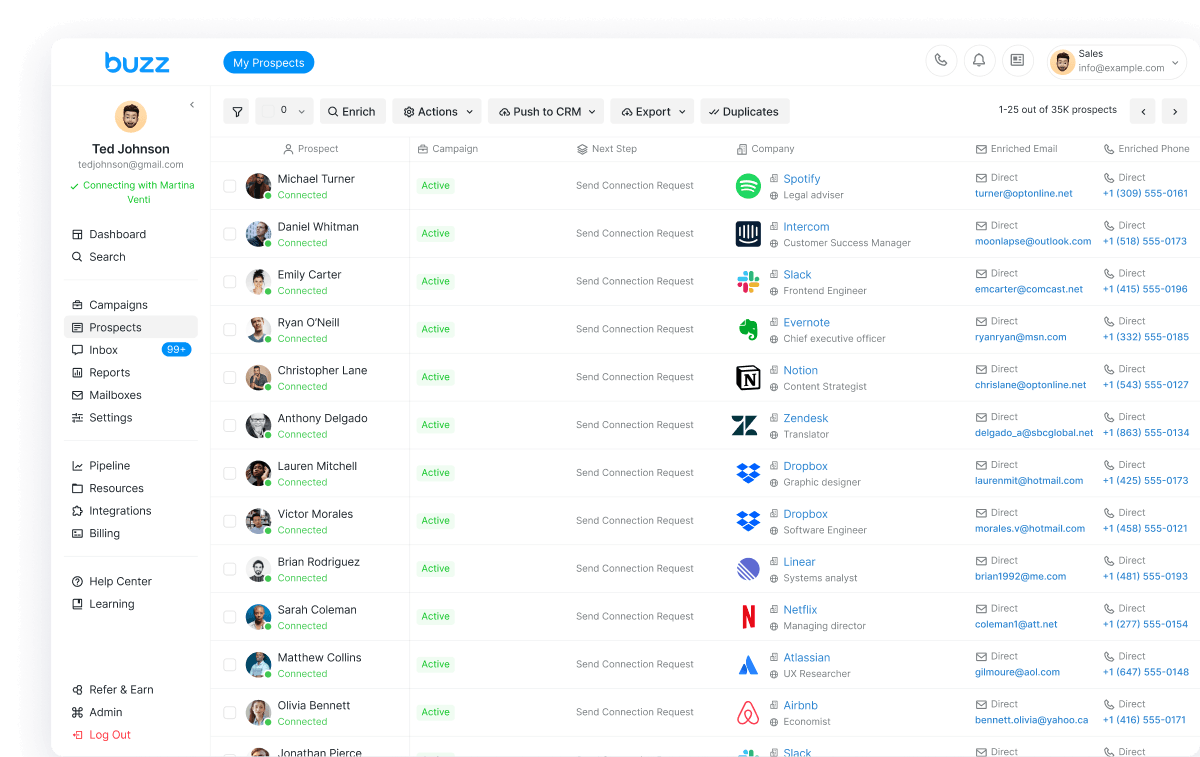
A white label deal is only as good as the product behind your logo. With Buzz White Label, the live page describes an all-in-one white-label outbound platform — LinkedIn, email, and data under your brand — instead of a three-tool stack. What is included:
- A branded dashboard on your domain. Your logo, your colors, your domain. Buzz is never mentioned in the client-facing experience.
- Wholesale pricing. You lock in wholesale rates, set your own retail prices, and keep the margin in between.
- Billing through Stripe. Built-in billing lets you charge clients through Stripe with no custom integration.
- Admin controls. An admin panel to manage accounts, monitor usage, and control permissions and client access.
- Client onboarding flows and templates, ready to use.
- A built-in AI assistant that helps your clients set up campaigns, write sequences, and respond to prospects.
- Premium tiers with AI Employee. Each AI Employee is a specialist built for a specific role; your clients pick the ones they need, and you earn on every seat.
Underneath, clients get the same LinkedIn automation that runs on Buzz LinkedIn automation: connection requests, messages, InMails, and profile actions run from the cloud, in the same sequence as email and call, with prospects pulled from Sales Navigator, LinkedIn posts, events, and groups.
Public entry pricing: White Label starts at $1,000/mo · 20 seats · billed annually, shown on buzz.ai/whitelabels/. The page also says Buzz sizes seats to how you launch and asks you to book a demo to talk seats and pricing, so treat the demo as the place to confirm your exact plan.
Build your pricing and margin math
There is no single right retail price, so build the math with your own numbers. The formulas below are a template, not a promise of any result.
Write down four inputs:
- Platform cost (A): what your white label plan costs you per month. The public entry plan is $1,000/mo, billed annually; use the figure on your own quote.
- Retail price (P): what you charge each client per seat or per package per month.
- Active paid seats (N): how many seats clients are paying you for this month.
- Your delivery cost (D): your own monthly cost to onboard, support, and manage clients (team time, tools, ads).
Then plug them in:
- Monthly revenue = P × N
- Monthly gross margin = (P × N) − A − D
- Break-even seats = (A + D) ÷ P
- Margin per add-on = your retail price for the add-on − the wholesale cost on your plan
Run the formula at a few retail prices before you publish packages. If break-even needs more clients than you can realistically sign this quarter, raise the price or bundle more service.
Package ideas you can price
You name the packages and set the prices. Common shapes:
- Software only: clients run their own LinkedIn and email campaigns in your branded dashboard, with the built-in AI assistant helping them set up.
- Software plus setup: you build the first campaigns and sequences, then hand over.
- Managed tier: you run campaigns for the client inside the same branded platform.
- Premium AI tier: add AI Employee seats for clients who want hands-off outreach.
The live page also says you can upgrade later by adding seats, data packs, outreach infrastructure upgrades, and AI Employee tiers as your client base grows — and every add-on goes through your billing at your margin. That gives you a natural way to grow revenue per client without changing tools.
Costs to pass through to clients
Some costs belong to each client account, not to your plan. Price them in so they do not eat your margin:
- Sales Navigator. Sales Navigator subscriptions are tied to individual LinkedIn accounts and do not extend to everyone in a workspace. Each LinkedIn profile typically needs its own subscription for InMail, lead lists, and advanced search (help article).
- Voicemail drop numbers. Billed per number on a recurring basis — $1 per number per month or $12 per year in USD, or the credit equivalent (white label admin guide).
- Dialer numbers. A one-time installation fee plus a recurring fee per number (white label admin guide).
- AI mailbox slots and sending domains. Each workspace pays for these separately; domains are bought for one year at a time (white label admin guide).
As a white label admin you can buy, renew, and delete these items and grant members purchase rights. They can be paid in USD or credits; your Customer Success Manager sets your default billing method.
Launch steps: from demo to first paying client
The live page says most partners are live within 48 hours, and many launch their first client the same day. Here is the order that keeps the launch clean.
- Pick one niche and one offer. Decide who you sell to and which package you lead with. Two or three design-partner clients beat ten strangers.
- Book a demo and size your plan. Go to buzz.ai/whitelabels/, confirm seats and pricing, and fill in input A in your margin formula.
- Brand your platform (about 0–2 hours). Upload your logo, set your domain, and pick your colors. Buzz provisions the branded environment in the background — no engineers needed on your side.
- Set up Stripe billing (about 2–4 hours with packages). Connect Stripe and build your packages. Activate the Stripe Customer Portal, turn on “Allow customers to update their payment methods,” and add your white label name, support email, privacy policy, and terms (Stripe portal guide).
- Invite clients. Invite users by email or share an invite code, set each person as Member or Admin, and grant access to at least one LinkedIn account — without that, invited users cannot see any accounts (add users, roles and permissions).
- Assign a success manager to each client workspace. In the Admin Panel you can create Success, Sales, or Success + Sales managers and assign them per workspace; clients see their assigned Success manager on the dashboard (managers guide).
- Set safe LinkedIn limits on every client account. See the next section.
- Collect revenue, then expand. Clients run outreach and you collect subscriptions. Buzz handles the infrastructure, support escalations, and hard technical questions; you own the brand and the margin. Add seats, data packs, and AI Employee tiers as clients grow.
One onboarding catch: every Buzz user is tied to a brand. If a new client gets a “user already registered” error, they may already have an account under another white label — contact Buzz support to transfer it to your workspace (users, brands, and workspaces).
Protect the LinkedIn accounts you resell to
Your margin depends on clients staying. Clients stay when their LinkedIn accounts stay healthy. LinkedIn sets its own limits and changes them without notice, so no tool can promise an account will never be restricted — but you can set every client up inside safe ranges:
- Per-account daily limits. Buzz’s guide to LinkedIn limits in 2026 recommends 15–25 connection requests per day on free LinkedIn, 25–40 on Sales Navigator, and 30–50 on Recruiter, under a typical weekly cap of about 100. Set it in Settings → Account Limits.
- Cloud, not a browser extension. LinkedIn tasks run on Buzz’s servers with Cloud Automation, which is on by default and included at no extra cost (Cloud Automation).
- Warm up new accounts on lower limits and ramp up over time, and withdraw old pending invitations.
For the full safety guide, read is LinkedIn automation safe.
How to choose white label LinkedIn software
Whichever vendor you evaluate, ask the same questions:
- Do clients ever see the vendor’s name, or is every screen yours?
- Can you set your own retail prices, and is billing built in?
- Is there an admin panel to manage each client’s accounts, usage, and access?
- Is it LinkedIn only, or LinkedIn plus email, data, and calling in one platform?
- Does LinkedIn automation run in the cloud or in the client’s browser?
For a wider shortlist, see best LinkedIn automation tools in 2026. If you are comparing specific tools, read our HeyReach alternative and Expandi alternative guides.
And if you only need outreach for your own pipeline, not a product to resell, white label is more than you need. Buy direct seats instead — Core is $79/month per seat. AI Employee is custom priced. Talk to sales. See buzz.ai/pricing.
Bottom line
Reselling LinkedIn automation turns outreach from hours you bill into software clients pay for every month. Pick the white label model, run your margin formula with your own numbers, price in pass-through costs like Sales Navigator, and launch with a few design-partner clients on safe LinkedIn limits.
Ready to resell LinkedIn automation under your brand? Book a White Label demo — $1,000/mo · 20 seats · billed annually; confirm your plan on the call. Want to see the LinkedIn automation your clients would get? Explore Buzz LinkedIn automation.